
Self-Publish a Children’s Book on Amazon KDP
Yes, you can self-publish a children’s book on Amazon KDP without a traditional publisher. The hard part is getting the manuscript, illustrations, trim size, layout, cover, metadata, pricing, and proof copy to work together before you upload anything.
If you’re publishing a picture book, treat the project as a production process. Writing is only one piece of it.
Amazon KDP lets you publish ebooks, paperbacks, and hardcovers. Print books get made on demand, so you don’t need to buy a big inventory upfront.
Table of Contents
Understand Your Audience Before Creating Your Children’s Book
Start with the reader.
The process starts by deciding the age group of your readers:
- Board Books: Ages 0–3
- Picture Books: Ages 3–8
- Early Readers: Ages 5–8
- Chapter Books: Ages 6–10
The age of the child affects the writing, illustration style, amount of text, page design, and the way parents will search for the book.
First decide what kind of book you’re making, who will read it, and what you want the physical book to feel like.
If you’re working with an illustrator, this is also the point to discuss the visual direction. Give the illustrator the finished or near-finished manuscript, character references, scene notes, and any important visual requirements. If you haven’t found an illustrator yet, you can find the best children’s book illustrators at Children Book Art.
Finish and edit the manuscript before illustration
This is where you can save yourself a lot of money.
Do not hire an illustrator before your manuscript is finished.
Complete your manuscript first, then revise it carefully. Take your time and make sure the story is exactly how you want it. If your budget allows, have it professionally edited and proofread before moving on to the illustrations.
Once the manuscript is ready, divide the story into pages or sections and describe what should happen in each illustration scene.
Doing this work before hiring an illustrator can save you money and time. It reduces the need for changes to the text, text placement, page layout, illustration scenes, and overall page count later in the project.
Choose your KDP trim size before finalizing the illustrations
New authors usually underestimate this decision.
KDP defines trim size as the final width and height of the printed book. The available sizes and page-count limits vary by print format and ink type. KDP also provides templates based on the trim size you select.
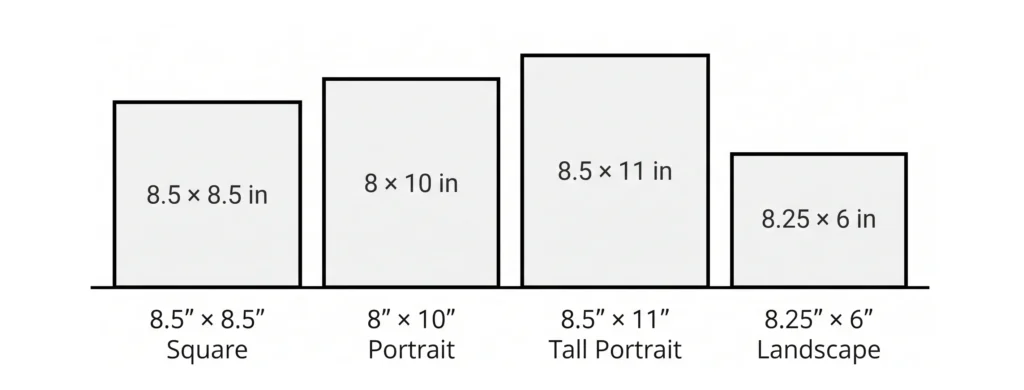
Don’t start by opening KDP and picking a random trim size. The most popular trim size for children’s books is 8.5 × 8.5 inches. You can also choose 8 × 10 inches or 8.5 × 11 inches. If you prefer a landscape (horizontal) book, 8.25 × 6 inches is a good option.
Once you’ve chosen the trim size, use KDP’s current template or file specifications when formatting the picture book.
Format the interior around bleed, margins, and the gutter
This is where children’s books get technical.
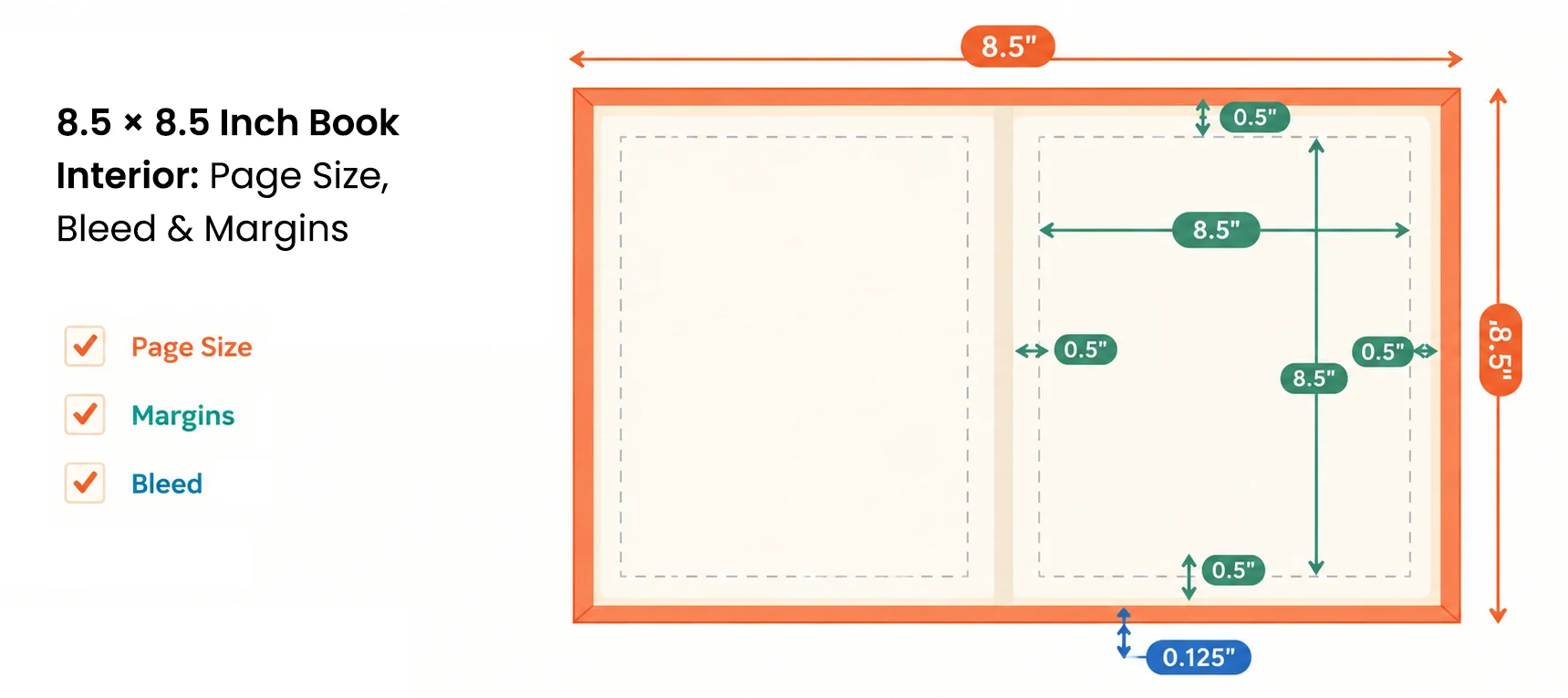
If an illustration or background extends all the way to the edge of the page, make sure to include bleed. Add 0.25 inches to the height and 0.125 inches to the width of the trim size.
Also, pay close attention to the gutter. To be on the safe side, keep the gutter at least 0.15 inches wide for children’s books.
Don’t put an important character’s face or any other important details directly into the binding area. Don’t place a line of text where part of it could disappear into the gutter. If you are using spread illustrations, avoid placing important characters or text in the middle of the spread. Part of the center area may not be visible or may be difficult to see once the book is printed and bound. You can also hire a professional for children’s book formatting to make to ensure correct bleed margins and the gutter.
Your goal is to produce a physical book that looks right after it’s printed and bound, not just a PDF that KDP accepts.
Create the book cover after the interior page count is final
This is one of the simplest ways to avoid rework.
Finish the interior first. Confirm the final page count. Then generate the appropriate KDP cover template and build the cover around it.
Why?
A paperback cover includes the front, back, and spine. The spine width depends on the number of pages in your book and the type of paper you choose on KDP.
KDP provides a cover calculator and template generator for this purpose.
At thumbnail size, the title should stay readable. The main character or visual idea should be clear. The cover should look like it belongs in the same category as the books you’re competing against, while still having its own identity. A experienced children’s book cover designer knows how to balance all three.
Decide whether you need paperback, hardcover, ebook, or all three
For many illustrated children’s books, print is the main product.
KDP supports paperback, hardcover, and Kindle ebooks.
An illustrated ebook needs a proper layout that is separate from the print PDF.
You can use Kindle Create to create the EPUB file using the fixed-layout PDF of the book interior. For the ebook cover, use the RGB front cover of the book in JPEG format.
The minimum number of pages depends on the type of book you want to publish.
- For an eBook, you generally need at least 5–10 pages to publish.
- For a paperback, you need a minimum of 24 pages.
- For a hardcover, you need at least 75 pages.
Hardcover publishing can be a challenge for children’s books on KDP because most children’s books are shorter than 50 pages. If your book does not have enough pages to meet the hardcover requirement, IngramSpark can be a good option for publishing a hardcover edition.
IngramSpark allows you to publish your children’s book in hardcover if it has at least 18 pages.
If you’re publishing both print and digital editions, plan for both from the beginning.
Decide which ISBN makes sense for you
KDP offers a free ISBN for eligible paperback and hardcover books. You can also purchase your own ISBN.
The difference matters.
A free KDP ISBN can be used for publishing through KDP. An ISBN you purchase yourself can be used to publish the same format through other publishing services, subject to those services’ requirements. KDP says ebooks don’t require an ISBN.
If your plan is simply to publish a paperback on Amazon, the free KDP ISBN may be enough.
If you expect to distribute the same print edition through multiple platforms, owning your ISBN gives you more control over the book’s publishing identity.
You can purchase your ISBN and barcode through Bowker. If you already have an ISBN but need a barcode, you can use an ISBN barcode generator to create one for free.
Upload the book, then actually use the previewer
Don’t treat the previewer as a formality.
Go through the entire book.
Look for:
- Text sitting too close to the trim.
- Text outside the safe area
- Artwork cut incorrectly.
- Problems around the gutter.
- Missing pages.
- Wrong page order.
- Cover alignment problems.
- Text that’s hard to read against the artwork.
KDP’s Print Previewer checks print files before publication, and KDP also provides Kindle Previewer for ebooks.
Then order a physical proof.
This matters even more for a color children’s book. Your monitor isn’t printed paper.
KDP describes proof copies as test copies meant for review before publication. Author copies become available after the book is live and get sold to the author at print cost.
Set Your Book Price Based on Printing Costs
This is where the phrase “cost to self-publish a children’s book” gets misleading.
There isn’t one universal cost.
You might spend money on editing, illustration, cover design, formatting, ISBNs, proofs, marketing, or other professional services. KDP itself doesn’t require a traditional print run because it uses print-on-demand. Your actual production budget depends on what you do yourself and what you outsource.
Then there’s the cost of manufacturing each copy.
KDP says paperback printing costs vary based on trim size, page count, ink type, and marketplace. Those costs get deducted when calculating your royalty.
So don’t pick a retail price first and hope the royalty works.
Enter your exact book specifications into KDP’s printing cost and royalty calculator. Then check what you’ll actually earn per sale.
For paperbacks sold through Amazon, KDP currently uses either a 50% or 60% royalty rate depending on the list price and marketplace, with printing costs deducted from the royalty.
For ebooks, KDP currently offers 35% and 70% royalty options, with additional conditions for the 70% option and delivery costs deducted where applicable.
Treat Amazon metadata as part of the book
Treat your Amazon listing as part of the book itself, not an afterthought you fill in at the end.
KDP asks for information such as your title, author, description, categories, audience, and keywords.
For keywords, KDP currently allows up to 7 keyword fields. Amazon recommends relevant search terms and specifically warns against vague, misleading, or promotional keywords.
Think like a parent. What would you actually type into Amazon to find a book like yours? Use those words as your keywords. Avoid adding unrelated popular terms just to get more searches.
Categories work the same way. KDP currently allows authors to select 3 categories during title setup, and recommends choosing categories that accurately describe the book.
Common mistakes that make children's books harder to publish
The same production mistakes keep appearing.
Choosing the trim size too late. The artwork and layout should be built around the final book dimensions.
Starting the cover before the interior is finished. The final page count affects the cover template.
Treating bleed as optional. If artwork should reach the edge, build the file correctly for bleed.
Skipping the physical proof. A file can look perfect on your monitor and still reveal problems once it’s printed.
Using generic keywords. KDP gives you 7 keyword fields. Use them for specific, relevant search concepts instead of broad, stuffed terms.
Pricing without checking print cost. Color printing changes the economics of an illustrated book. Use KDP’s current calculator instead of copying someone else’s royalty example.
One more current KDP requirement: if you use AI-generated text, images, or translations, you have to disclose that during publishing. AI-assisted content doesn’t carry the same disclosure requirement under Amazon’s current definition.
Conclusion
Self-publishing a children’s book on Amazon KDP is possible with the right planning. Finish your manuscript first, choose the correct trim size, prepare the interior and cover carefully, and review a physical proof before publishing. Paying attention to these details can help you avoid costly mistakes and publish a professional-looking children’s book.
